


Master Your Home Wi-Fi: The Ultimate Guide to a Faster, Smarter Connection
Is your video call freezing at the worst moment? Does Netflix buffer even though you’re paying for a fast plan? In many Algarve homes, especially villas, thick-wall properties, and multi-floor houses, the issue isn’t your internet plan. It’s your Wi-Fi setup.
This guide shows you how Wi-Fi really works, how to diagnose the most common problems, and what to do to get fast, stable coverage in every room, including when it’s time to upgrade to mesh Wi-Fi.
Wi-Fi vs Internet: What’s the Difference?
Think of internet as the connection coming into your home (fibre/cable), and Wi-Fi as how that connection is distributed wirelessly to your devices. You can have a fast fibre line and still experience poor Wi-Fi if:
- Your router is in the wrong place
- Your home has thick walls or long distances
- Your router is outdated or overloaded
- There’s interference from other networks/devices
Quick Basics: Modem, Router & Your Devices
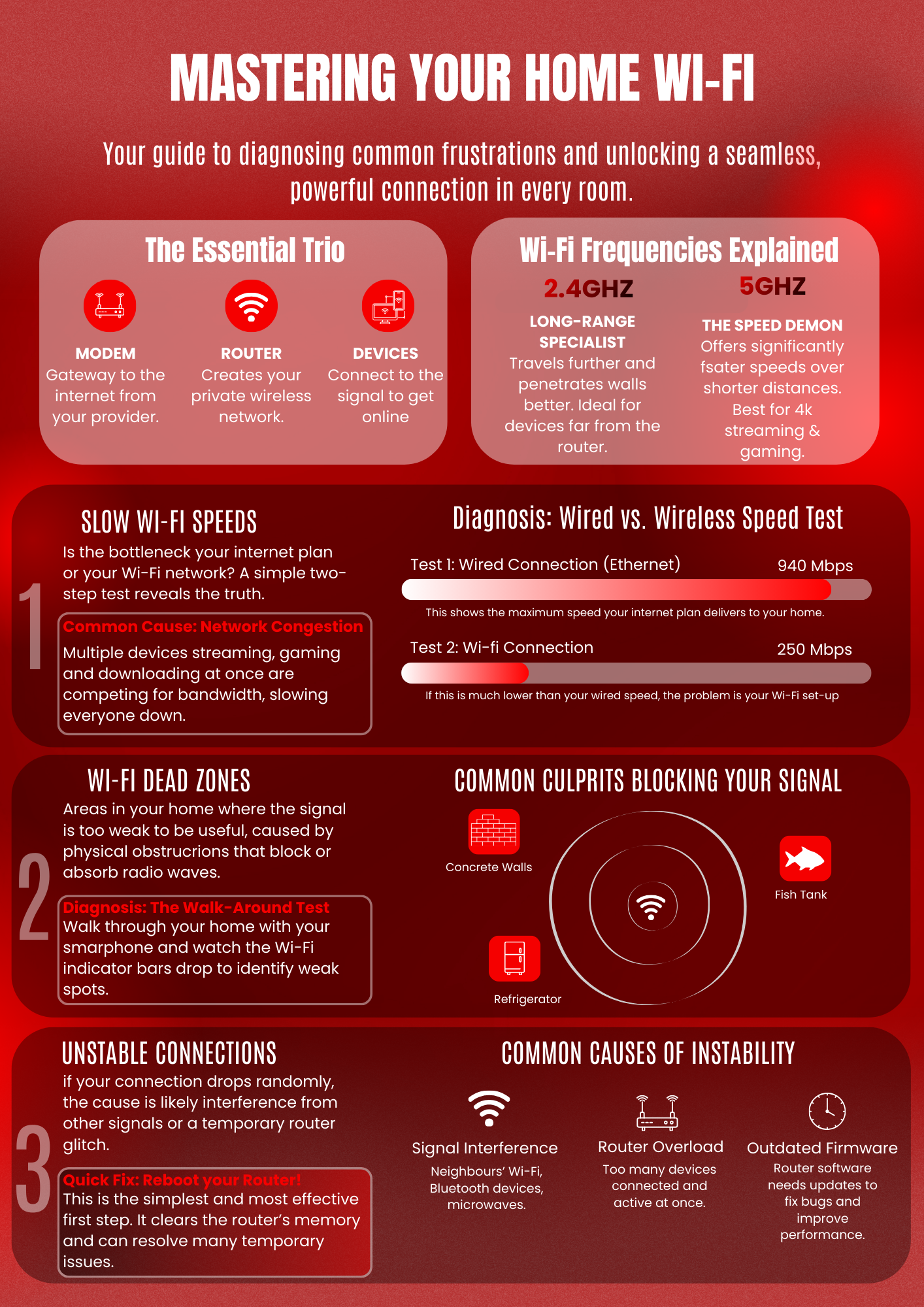
- Modem/ONT: connects your home to the provider’s network (fibre gateway).
- Router: creates your Wi-Fi network and manages traffic between devices.
- Devices: phones, laptops, TVs, cameras and smart home gadgets that connect to Wi-Fi.
2.4 GHz vs 5 GHz: Which One Should You Use?
- 2.4 GHz: longer range, better through walls, slower speeds (great for distant rooms and smart devices).
- 5 GHz: faster speeds, shorter range (best near the router for 4K streaming, gaming, and video calls).
Modern routers can steer devices automatically, but in many homes, a good layout (or mesh) makes the biggest difference.
The 3 Most Common Wi-Fi Problems (And How to Identify Them)
1) Slow Wi-Fi
Do this simple check: run a speed test wired (Ethernet) and then over Wi-Fi. If wired speed is good but Wi-Fi is slow, the problem is your home network (not the fibre line).
2) Dead Zones (Weak Signal Areas)
Dead zones happen when Wi-Fi signals are blocked or weakened by distance and obstacles (common in Algarve properties with thick walls). Walk around the home and note where signal drops.
3) Unstable Connections (Drops & Freezes)
Random disconnects often come from interference, overloaded routers, or outdated firmware. Restarting the router can help short-term — but consistent stability usually requires better placement or upgraded equipment.
Free Fix: Router Placement That Actually Works
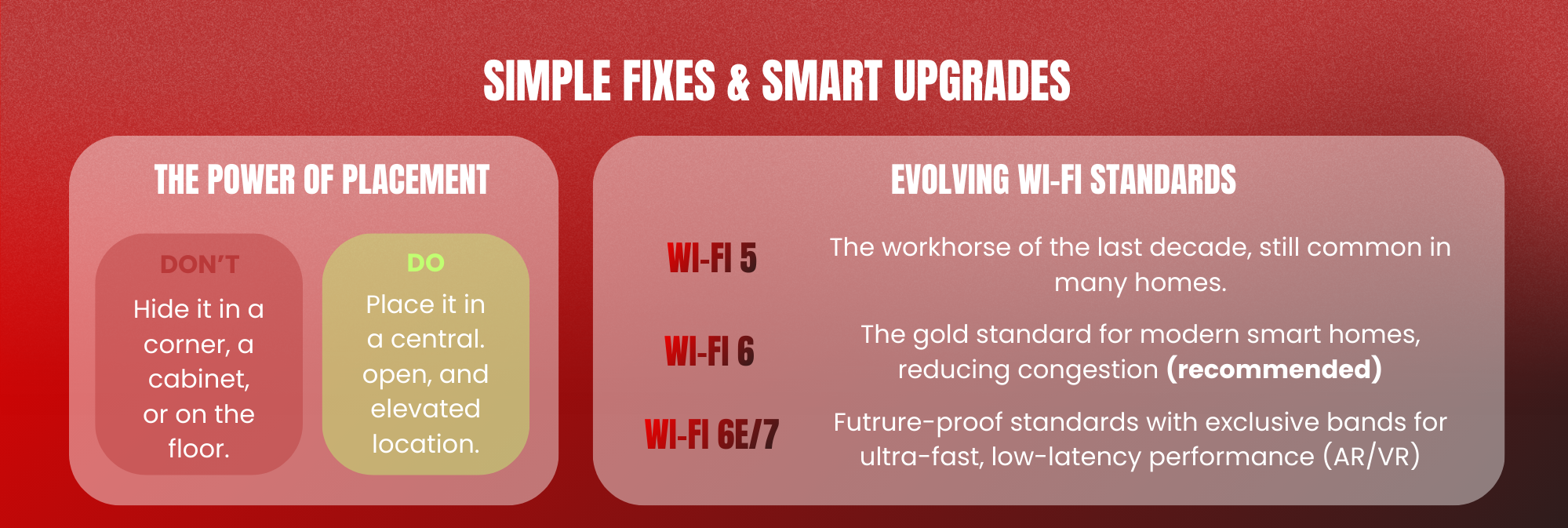
The biggest improvement is often free: place your router in a central, open, elevated spot.
- Keep it out of cupboards and behind TVs
- Avoid placing it next to large metal objects or mirrors
- Don’t place it on the floor or in a corner of the home
- Keep it away from microwaves, baby monitors, and Bluetooth-heavy areas
When a Single Router Isn’t Enough: Extender vs Mesh Wi-Fi
Wi-Fi Extenders (OK for small fixes)
- Good for one weak room
- Often cheaper
- Can reduce speed and may create separate network names
Mesh Wi-Fi (Best for Algarve homes & villas)
A mesh system uses multiple nodes to create one seamless network name across the entire home. It’s the best solution for multi-floor homes, thick walls, long corridors, and properties with outdoor areas.
- Eliminates dead zones
- Maintains better speeds room-to-room
- Improves stability for video calls and streaming
- Ideal for smart homes, CCTV, and remote work
Security Essentials: Protect Your Home Network
- Use a strong Wi-Fi password (avoid names/addresses)
- Enable WPA2/WPA3 security on the router
- Keep router firmware updated
- Create a guest network for visitors and short-term rentals
Why Lazer Telecom for Fibre + Smart Home Wi-Fi in the Algarve?
- Local Algarve focus: we know the connectivity challenges of regional homes
- English, Portuguese and Spanish speaking support: ideal for expats and international residents
- Professional installation: set up properly from day one
- Smart Wi-Fi guidance: advice on placement, coverage and mesh options
Want Better Wi-Fi in Your Algarve Home?
If your fibre is fast but your Wi-Fi isn’t, we can help you fix coverage and stability, and recommend the right setup for your home.